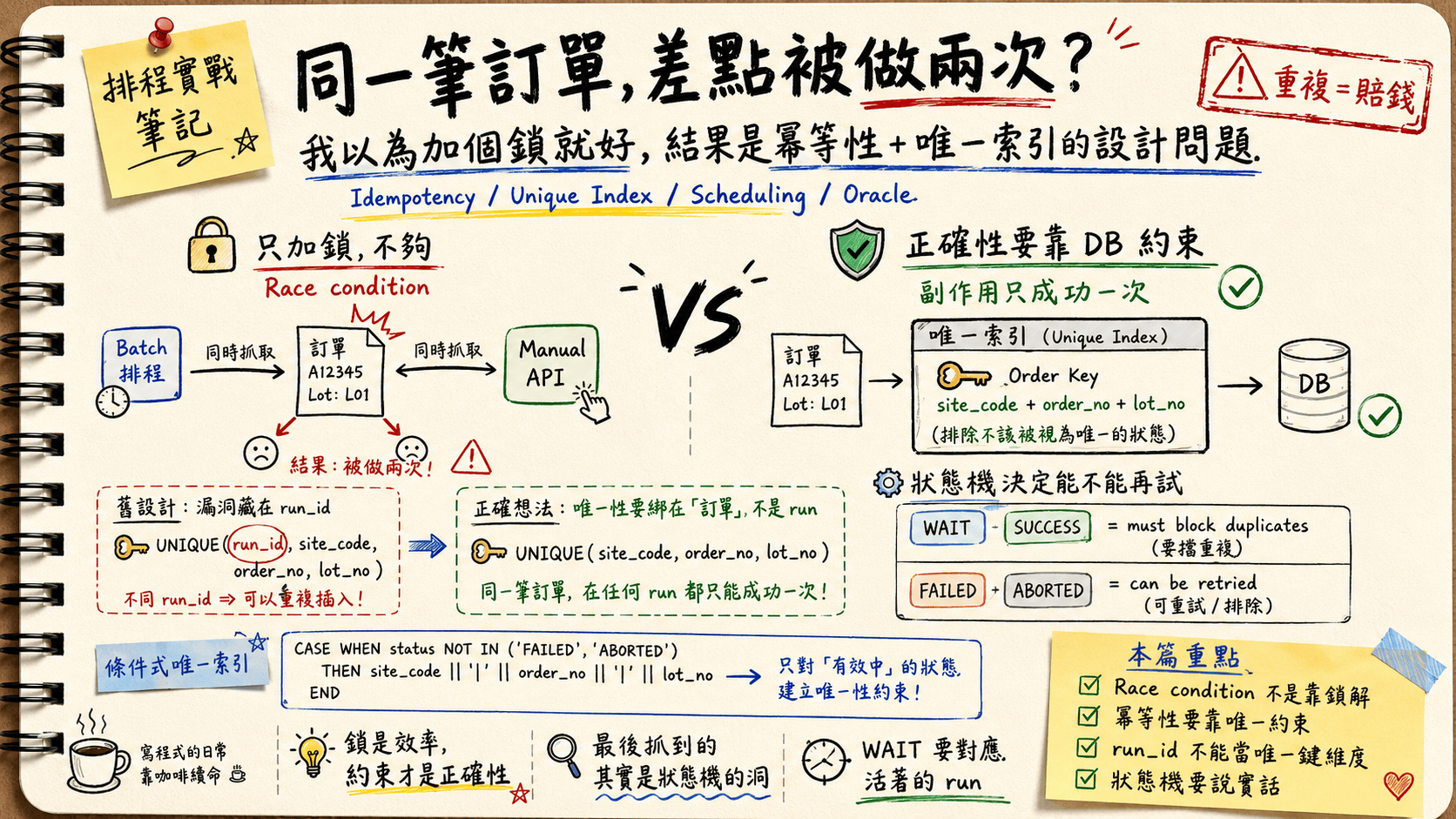
TL;DR
- A batch job runs every 4 hours, pulls ~1,000 unscheduled orders (
schedule = N), processes them one by one, and flips each toY. A manual POST API can do the exact same thing. When they overlap, both read the sameNrow, both process it, both flip it toY— and the same order gets produced twice. In a factory, that’s scrap, not a wasted CPU cycle. - A lock is not where correctness lives. A lock lowers the odds of a collision; it does nothing against a crash or a retry. For “duplicate = money,” correctness has to land on the side effect happening at most once — which means a deterministic key + a unique constraint, not a mutex.
- The real bug: the unique constraint included
run_id. Batch and manual have differentrun_ids, so the same order looked like two different rows and slipped through. Fix: bind uniqueness to the order, not to which run created it. - But
FAILEDorders must be re-schedulable whileSUCCESSones never are, so a global unique won’t do. The answer is a partial unique index — on Oracle, a function-based index where excluded statuses returnNULLfor every key column, because all-NULL rows don’t enter the index. - The deepest lesson came last: after the index went in, new runs still broke — because dead runs left orphan items stuck in
WAIT, andWAITwas secretly carrying two meanings. I wasn’t fixing an index. I was fixing a state machine. - The thread running through the whole thing: every fact and every state deserves its own honest home. Don’t make one column — or one table — carry two meanings.
The stakes: an order made twice isn’t waste, it’s money
I had a manufacturing scheduling pipeline that worked roughly like this:
An order made twice isn’t waste, it’s money: the batch and the manual API both grab the same still-N order at almost the same instant and each flips it to Y — so this isn’t a performance problem, it’s a correctness problem.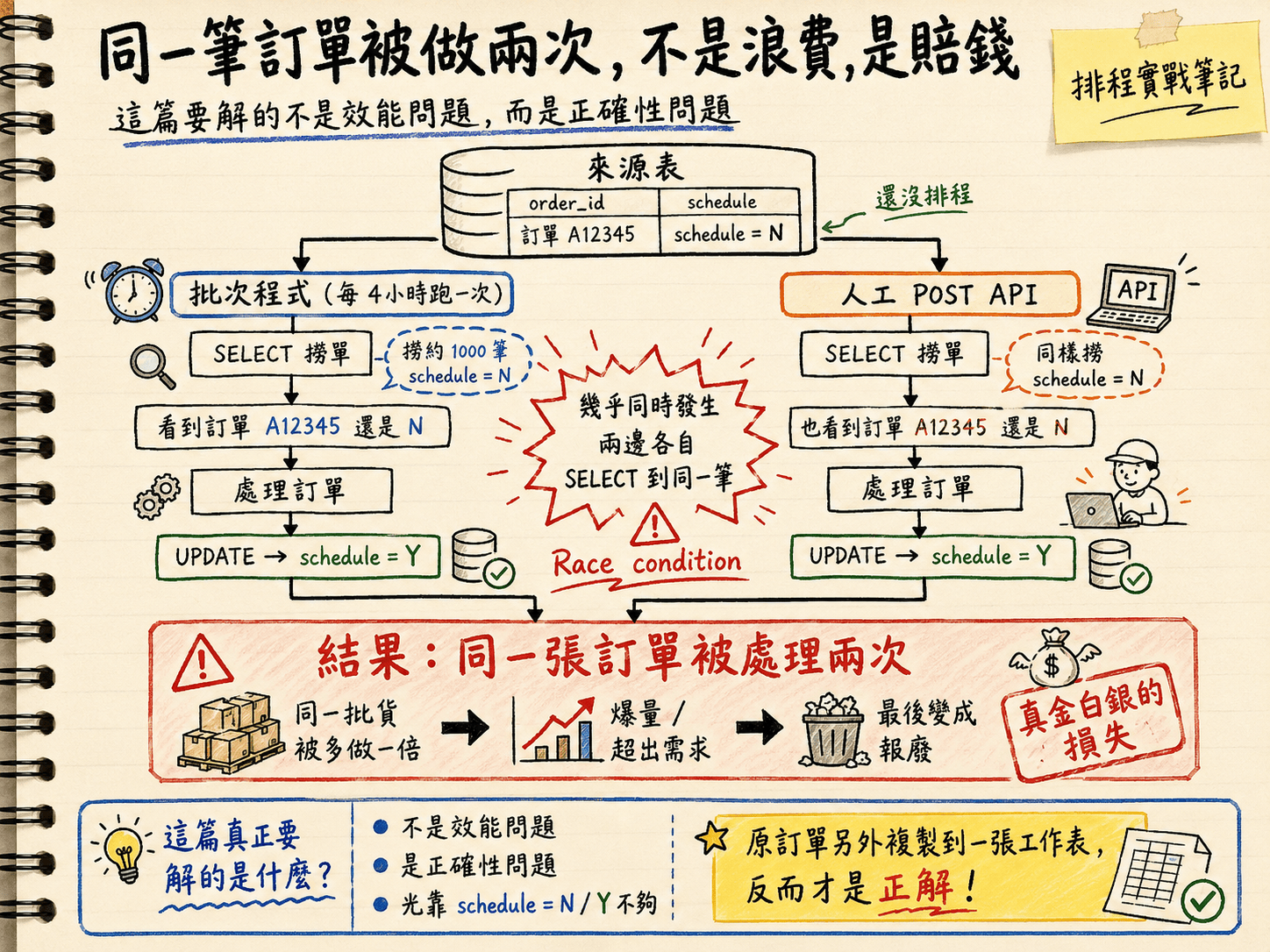
schedule = N), processes them one at a time, and once an order is done it flips that flag to schedule = Y. At the same time, a user can trigger the same work by hand through a POST API — same thing: grab the rows still on N, process, flip to Y.
Now I’m adding a manual scheduling API. If the batch and the manual trigger run at the same time, both SELECT the same order while it’s still N — and the same order gets processed twice, because both conclude “nobody’s touched this yet, I’ll take it,” and each processes it and flips it to Y.
The result — the same order got processed twice. GG!!
If this were a coupon system, a duplicate means one extra coupon and a shrug. But this is manufacturing scheduling. The same order produced twice means a batch of goods made at double the quantity: overproduction, demand exceeded, and eventually scrap. This isn’t the “we wasted a little compute” tier of problem. It’s real money walking out the door.
So this isn’t a performance problem; it’s a correctness problem — and I badly underestimated it at first. I even caught myself thinking, why did my colleague over-complicate this, copying the order out into a whole separate table? Turns out that was the right answer.
Layer 0: I thought the original author was just making work for themselves
On day one with this pipeline, I got stuck on a design decision before I’d written a line.
The order already exists in the source table. But this system also copies it into a separate work-item table, schedule_item, which has its own set of statuses (WAIT / SUCCESS / FAILED / ABORTED). My first reaction was pure gut:
Was the original author just making work for themselves? The source table already has an
N/Yflag — why a whole extra table with a pile of statuses? Isn’t this a flat-out violation of single source of truth?
It took me a while to see that the table I’d dismissed as redundant is exactly the foundation that lets this whole thing not go wrong. And the reason I misjudged it is that I’d misunderstood what SSOT even means.
SSOT says “every fact has one authoritative home.” It does not say “fewer tables is better.” I’d read “single source of truth” as “merge it into one table.” But there are actually two different facts here:
- “What is this order’s business data?” → its home is the source table.
- “What is this order’s scheduling / processing state?” → its home is the
schedule_itemtable.
Two different facts, each with one home. SSOT isn’t violated — it’s actually what lets the data’s state be reflected correctly. The thing that actually violates SSOT is cramming processing state back into that N/Y flag on the source table — that forces one column to carry two meanings at once: “business data” and “processing progress.”
And here’s the part that matters most: the lifeline of everything that follows — the unique constraint — has to hang on the entity table that records the act of processing. An N/Y flag that flips back and forth has nothing to anchor a constraint to, and can’t guarantee “succeeds exactly once.” N/Y is a binary; it can’t express in-progress, failed, re-schedulable, or aborted. And the partial unique index, the state machine, the ABORTED status, the reaper — all of it rests on the premise that a work item has its own multi-state column. Without that table, none of what follows even works.
To be honest, though, I owe one caveat: a separate table is not a silver bullet. If this were a one-shot, stateless marker with no retries and no cost to duplication, a flag is plenty, and a whole extra table is over-engineering. It pays off here specifically because this situation has all of: multiple states, retries, and duplicates that cost money. The original author was right — but “right” comes with preconditions.
Lesson, learned the hard way: seriously, don’t go trash-talking someone’s design before you’ve actually understood it. XDDD
Layer 1: I thought I’d just add a lock
Let me explain why I was trash-talking it in the first place — back to that “two flows doing the same row” race condition.
This is a textbook read-then-write race: read the state → act on the state → write the state back, with no atomicity across the three steps, so something cuts in line in the middle. My first instinct was everyone’s first instinct: “just add a lock — whoever grabs it first does it.”
But there’s a blind spot here that’s easy to miss, and I only saw it after walking into it:
The batch’s “pull a thousand rows”
SELECTis a candidate list, not ownership — someone else can still take a row out from under you.
The batch pulls a thousand orders to process at second 0, but the system then spends several minutes working through them one at a time. During those minutes, the manual API is perfectly free to cut in and change the status of one of the rows on that list. The list the batch is holding started going stale the instant it was fetched.
If you do want to do something at this layer, you can use CAS (compare-and-swap): instead of processing unconditionally, first try to claim the row with a conditional UPDATE:
-- I only win it if it's still WAIT; only proceed if I won
UPDATE schedule_item
SET status = 'PROCESSING'        -- claim it (a transient "in progress" status)
WHERE run_id = :run_id
  AND status = 'WAIT';
-- check affected rows: 1 = I claimed it, 0 = someone beat me to it, skip
This makes “claim one row” atomic and drops the collision rate a lot. But I need to say upfront: this still isn’t the root of correctness — it’s only an efficiency layer. Why, though?
Layer 2: a lock isn’t the source of correctness — idempotency is
This is the pivot of the whole post, and the part I find most valuable.
What a lock (or a CAS) buys you is a lower probability of two flows fighting over the same row. But it can’t stop two things: crashes and retries.
Picture the batch claiming a row, starting production, and then dying halfway through — or the network drops, a downstream timeout fires, and an automatic retry kicks in. A lock doesn’t help you in any of those cases: the retry comes back believing “I haven’t finished this yet” and does it again, and the side effect (production) happens a second time. For a “duplicate = money” scenario, a lock alone isn’t solid enough.
Correctness has to land somewhere much harder:
Make the side effect itself happen at most once. No matter how many times you’re called, how many retries fire, or how many flows arrive at once, this order gets successfully processed exactly once. That’s idempotency.
How do you guarantee it? With a key derived from the order’s own uniqueness, plus a unique constraint. The same order — batch or manual, called once or a hundred times — always derives the same key, and the unique constraint makes “succeeding a second time” fail outright at the database layer.
A lock is efficiency. A constraint is correctness. The lock keeps everyone from colliding; the constraint guarantees that even if they do collide, the same order only counts once.
So I went back and inspected the unique constraint on this schedule_item table. And then it clicked — what a clever design!!!
Layer 3: cracking it — the hole was hiding inside run_id
The table already had a unique constraint, put there from the start precisely to block duplicates — not the “why make a redundant copy and saddle myself with another dataset to maintain” nonsense I’d accused it of.
It looked roughly like this (please don’t get me put on a PIP for sharing), four columns:
UNIQUE (run_id, site_code, order_no, lot_no)
site_code / order_no / lot_no are the order’s business key — those three together really do uniquely identify an order. The problem is the column leading the pack: run_id — the id of which run created the item.
And the batch and the manual trigger are two different runs, so their run_ids are naturally different.
Here’s the tragedy: the same order (identical site_code / order_no / lot_no) — because one came from the batch run and one from the manual run, with different run_ids — looks like two completely different rows to the database. The unique constraint looks at the two of them, thinks “different keys, no duplicate here,” and cheerfully lets both in.
Uniqueness was bound to which run created it, not to which order this is.
That’s the root cause of why no lock, however strong, could ever hold the line — the lock wasn’t too weak; the constraint was on the wrong dimension from the start.
The fix is almost insultingly simple: drop run_id. Bind uniqueness to the order:
UNIQUE (site_code, order_no, lot_no)
Just as I was thinking ta-da, solved! — the joy lasted all of three seconds before the next problem showed up.
Layer 4: but orders get re-scheduled → a partial unique index
After dropping run_id and going to a three-column global unique, a new run couldn’t even create an item for the same order. Because —
FAILED orders are supposed to be re-schedulable.
The business rule is this: an order that fails to schedule this round (FAILED) should be picked up again next round and re-scheduled; but an order that already succeeded (SUCCESS) must never be scheduled a second time.
If I use a three-column global unique, then a once-FAILED order trying to come back in collides with its own previous FAILED row and can’t insert. That means “fail once and you can never retry,” which is obviously wrong.
So what I want isn’t “global uniqueness,” it’s conditional uniqueness: guarantee uniqueness only on the blocking states (“succeeded” and “waiting to be scheduled”), and let the re-schedulable states through.
- Blocks (must be unique):
WAIT,SUCCESS - Re-schedulable (let it through):
FAILED,ABORTED
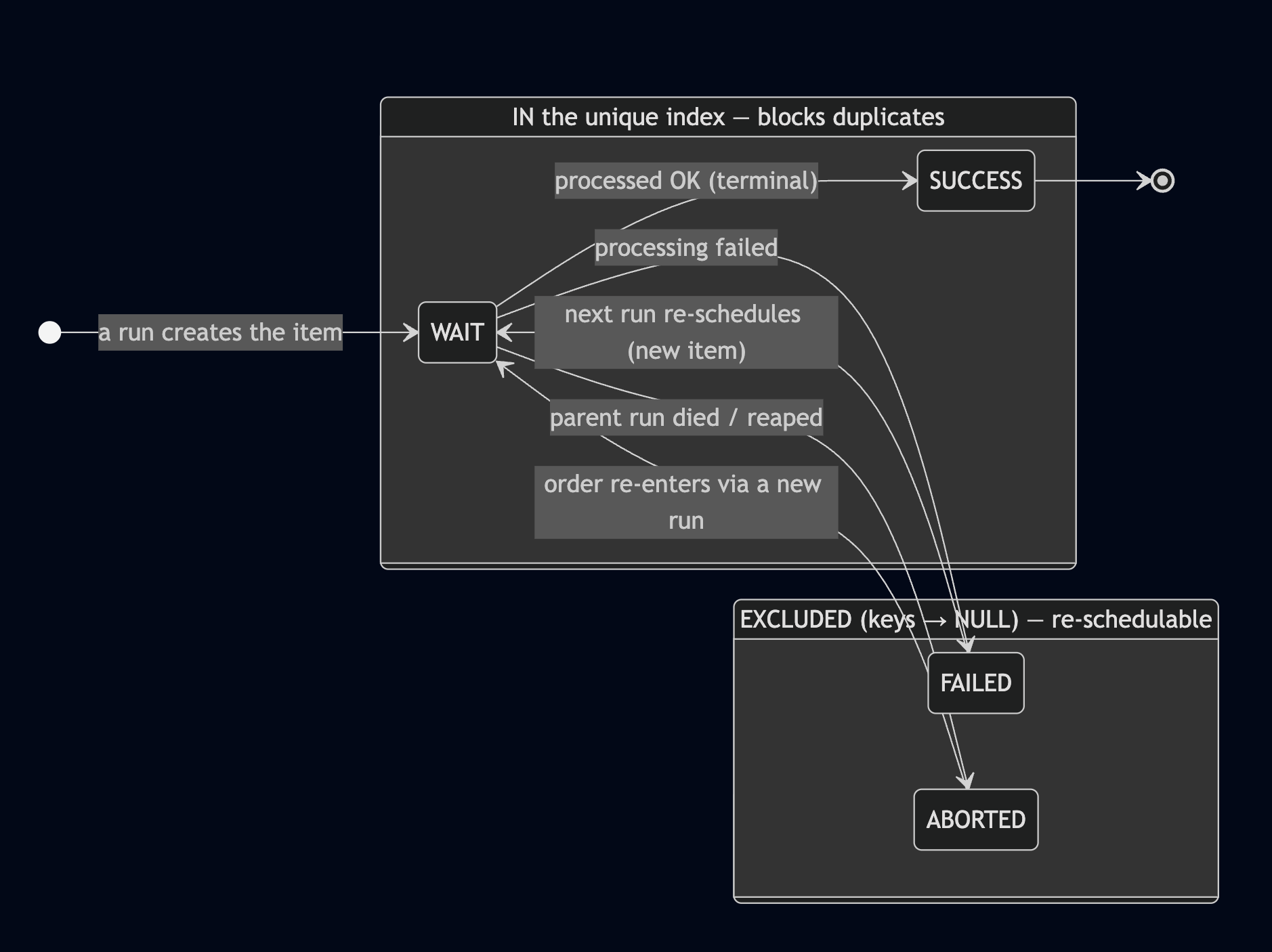
Figure 1. The schedule_item state machine — WAIT / SUCCESS enter the unique index (block duplicates); FAILED / ABORTED have all three key columns flattened to NULL and are excluded from the index (re-schedulable).
Oracle doesn’t have Postgres’s CREATE UNIQUE INDEX ... WHERE ... partial-index syntax, but it has a lovely equivalent: a function-based unique index plus the rule that a row whose key columns are all NULL does not enter the index.
So I use CASE WHEN to make the excluded statuses return NULL for all three key columns. Once all three are NULL, the row isn’t collected into the index, and therefore doesn’t participate in the uniqueness check:
CREATE UNIQUE INDEX ux_item_dedup ON schedule_item (
  (CASE WHEN status NOT IN ('FAILED','ABORTED') THEN site_code END),
  (CASE WHEN status NOT IN ('FAILED','ABORTED') THEN order_no  END),
  (CASE WHEN status NOT IN ('FAILED','ABORTED') THEN lot_no    END)
);
FAILED / ABORTED rows get all three columns flattened to NULL by the CASE → not in the index → re-schedulable as many times as you like. WAIT / SUCCESS rows enter the index normally → the same order is blocked dead.
There’s one deliberate choice in here: I used a blacklist NOT IN ('FAILED','ABORTED'), not a whitelist IN ('WAIT','SUCCESS'). The reason is fail-closed — if someone later adds a new status and forgets to update this logic, the blacklist’s default behavior is to treat it as a blocking status, i.e. it errs toward safety (better to block by mistake than to let a duplicate through). A whitelist does the opposite: a new status defaults to being let through and not participating in uniqueness — that’s fail-open, which is a dangerous default in a “duplicate = money” world.
At this point the problem is, in theory, solved. Then I actually ran the index against the database — and hit two potholes.
War stories from the potholes
Pothole 1: ORA-02158: invalid CREATE INDEX option
I pasted that SQL into DBeaver, ran it, and Oracle threw ORA-02158: invalid CREATE INDEX option back at me. I stared at the SQL for a long time. The syntax was clearly fine.
It turned out: this isn’t a SQL error, it’s a parser bug in the client tool. DBeaver mis-parses a “bare CASE” inside a function-based index and then pins the blame on Oracle.
Two fixes, pick either:
- Wrap each
CASEin an extra pair of parentheses so the parser doesn’t choke:(CASE ... END)(the SQL above is already wrapped — paste it as-is and it goes through). - Or just use a different client — run it in SQL*Plus or SQL Developer and the problem never appears.
A parser bug cost me half an hour. Writing it down so the next person loses zero.
Pothole 2: ORA-01452: cannot CREATE UNIQUE INDEX; duplicate keys found
With the parentheses in place I ran it again, and this time got ORA-01452: ... duplicate keys found. This one isn’t a false alarm — it’s telling me: the existing data already contains duplicates.
In other words, this bug had already fired in the past, duplicate orders were already lying in the table, and nobody had noticed. First, hunt them down:
SELECT site_code, order_no, lot_no, COUNT(*) cnt,
       LISTAGG(status, ',') WITHIN GROUP (ORDER BY status) statuses
FROM schedule_item
WHERE status NOT IN ('FAILED','ABORTED')
GROUP BY site_code, order_no, lot_no
HAVING COUNT(*) > 1;
Once found — the key point: the fix is not DELETE. Deleting outright is too blunt, and it throws away the audit trail. What I want is a soft transfer: in each duplicate group, keep exactly one “rightful” row and flip the rest to ABORTED (voided, but retained).
There’s a rule for which one to keep: if the group contains a SUCCESS, keep the SUCCESS (an accomplished fact can’t be touched); otherwise keep the most recent WAIT. One UPDATE with ROW_NUMBER() does it:
UPDATE schedule_item SET status = 'ABORTED'
WHERE ROWID IN (
  SELECT rid FROM (
    SELECT ROWID rid,
           ROW_NUMBER() OVER (
             PARTITION BY site_code, order_no, lot_no
             ORDER BY CASE status WHEN 'SUCCESS' THEN 0 ELSE 1 END,
                      created_at DESC
           ) rn
    FROM schedule_item
    WHERE status NOT IN ('FAILED','ABORTED')
  )
  WHERE rn > 1
);
That ORDER BY is the crux: push SUCCESS to the front (THEN 0), then created_at DESC so the newest comes first; ROW_NUMBER numbers each group, rn = 1 is the rightful row to keep, rn > 1 all get voided. Once it’s clean, the index builds.
If you’d rather not touch the existing data: ENABLE NOVALIDATE
If your situation doesn’t allow touching existing rows (audit requirements, or the volume is too large to dare), there’s another path: a virtual column + a non-unique index + a unique constraint with ENABLE NOVALIDATE.
NOVALIDATE means “protect new rows going forward, but don’t go back and validate the existing ones.” It effectively grants the existing real duplicates an in-place amnesty and only guards the future. The cost is explicit: those existing real duplicates are not protected. Whether to use it depends on whether you can live with “the past is what it is.” I went with the soft transfer above, because I wanted the existing data clean too.
Layer 5: WAIT is lying — it was a hole in the state machine
The index was built, the existing data was clean, and I thought this was over. The next day, new runs broke again.
Same error: colliding with the unique index. I dug for a while and found the culprit — a batch of work items stuck in WAIT whose parent runs had died long ago, but which were still sitting at WAIT themselves, still living in the index, blocking the new run from creating fresh items for the same order.
The root cause surfaced, and it’s exactly the same disease as that SSOT thing at the very start:
The status
WAITwas being made to carry two meanings:
- “I belong to a live run, queued and genuinely waiting to be processed” (really pending)
- “My parent run is already dead and I’m an orphan” (should’ve been voided ages ago)
One column, two meanings. And the index can only see its own table — it won’t, and shouldn’t, JOIN to the parent run to decide whether you’re an orphan. So the status column itself has to tell the truth.
The invariant to hold, in one sentence:
A
WAITitem must correspond to a living parent run.
Let me pin down “living” first. A run has its own states too: CREATING / RUNNING are alive (still going), DONE / ERROR are terminal (finished). An “orphan WAIT” is an item still sitting at WAIT while its parent run has already entered DONE or ERROR.
To hold the invariant, I did three things, plus one optional:
(1) When a run flips to ERROR, sweep its WAIT items with it. When a run enters the terminal ERROR state, flip its still-WAIT items to ABORTED — the run is dead; its to-do items shouldn’t keep hanging around blocking others.
(2) A reaper sweeps orphans on a schedule. Add a scheduled job that periodically flips orphan WAIT items (“parent already dead, or stuck too long”) to ABORTED, as a safety net for whatever (1) misses:
UPDATE schedule_item si SET status = 'ABORTED'
WHERE si.status = 'WAIT'
  AND NOT EXISTS (
    SELECT 1 FROM schedule_run r
    WHERE r.run_id = si.run_id
      AND r.status IN ('CREATING','RUNNING')   -- only these two count as "alive"
  );
(3) Encode the invariant as a monitoring query. The ideal state is that this query always returns zero rows; the moment it’s > 0, the invariant has been broken and it should page:
SELECT si.* FROM schedule_item si
JOIN schedule_run r ON r.run_id = si.run_id
WHERE si.status = 'WAIT'
  AND r.status NOT IN ('CREATING','RUNNING');   -- WAIT, yet hanging under a dead run
(4) (optional) Clean up at creation time. Before a new run inserts, sweep up the orphan WAIT items that have “no living parent.” But there’s a mistake here you absolutely cannot make:
Never, ever indiscriminately wipe all
WAITitems.
Because right now there may be another live run with a pile of WAIT items under it too — those are orders it’s about to process. An indiscriminate sweep would kill the orders someone else is actively working on, and directly cause dropped orders — and a dropped order, in manufacturing, costs money just the same. The cleanup must carry the “parent is dead” condition; not one extra row gets killed.
Two last design decisions worth explaining:
- Why a separate
ABORTEDinstead of reusingFAILED? Because the semantics differ.FAILEDmeans “this scheduling attempt failed, re-schedule it later”;ABORTEDmeans “this one is void, don’t touch it again.” If I stuffed orphans back intoFAILED, the next round would treat them as “pending re-schedule” and pull them right back in — the problem recurs on the spot. Different meanings deserve their own honest state — which loops straight back to the main thread. - An iron rule: any new re-schedulable status must be added to the index’s exclusion list in lockstep.
ABORTEDhas re-schedulable semantics (it doesn’t block), so it must be insideNOT IN ('FAILED','ABORTED'). Miss that step and voided items keep occupying the index and blocking new orders. The state machine and the index evolve as a bound pair — change one and you have to think about the other.
And the deepest lesson of the whole thing: I wasn’t fixing an index at all. I was fixing a state machine. The index was just the faithful informant — it forced a long-dormant data-model bug, one nobody had noticed, straight out into the open.
Closing: I’d been asking the wrong question all along
Looking back over the whole trip, the things I want to keep:
- Correctness should live in DB constraints, not in the app’s locks. A lock lowers collision odds — that’s the efficiency layer; a unique constraint guarantees the side effect counts once — that’s the correctness layer. Don’t conflate them, and don’t use a lock to pretend you have correctness.
- A unique index is the most honest informant you have. It forced a long-dormant bug, buried in the data model, out into the light. A lot of “intermittent, can’t-find-it, can’t-reproduce-it” weirdness has its root in a constraint placed on the wrong dimension.
- Encode your key invariants as a single executable SQL query, and monitor on it. An invariant like “a
WAITitem always has a living parent” is far more reliable as a “should always be zero” query wired to an alert than as a sentence gathering dust in a doc. A constraint that can speak beats the prettiest comment. - Maintenance takes discipline. The state machine and the index’s exclusion list are welded together — add a new status and you have to think about the index at the same time; the blacklist is fail-closed, always erring toward safety.
But honestly, the biggest takeaway has little to do with the tech.
This whole trip kept re-proving one principle: every fact, every state, deserves its own honest home — don’t make one column, or one table, carry multiple meanings. At the start I scoffed at “a separate table for an order” as redundant; at the end I caught the “
WAITmeans two things” hole. They’re the head and the tail of the same disease.
I walked in with a “was the original author just making work for themselves?” attitude. The whole debug was really the process of me slowly coming to understand why this design was built the way it was. The biggest thing I gained: I realized I’d been asking the wrong question from the start. I was asking “why not merge it into one table,” when the right question was always “where should this fact’s home be?”
Technologies go stale; “understand before you criticize” doesn’t. Glad I had Claude — my code consultant — to drum that one into me.
Reference
- Oracle Database — Function-Based Indexes (the all-
NULL-key rows don’t enter the index behavior) - Oracle Database —
ENABLE NOVALIDATEconstraint state - Idempotency and deterministic-key design: using a unique constraint to guarantee exactly-once in systems where “duplicate = side effect”